Shared library - static link specific dependency edit

http://www.mail-archive.com/libtool@gnu.org/msg10643.html

Hello Alon, and sorry for the delay,

* Alon Bar-Lev wrote on Fri, Jun 06, 2008 at 09:15:37AM CEST:
> > > I want to make a shared library without dependencies. I compile the
> > > dependencies in PIC mode, so it should be compatible.

> Let's say I have liba.la pointing to liba.so* and liba.a(pic)
> installed in my system. I am not building this right now.
> Now, I would like to create moduleb.so that use liba but I do not want
> to have external dependency of liba.so*.

Ah, ok. Libtool doesn't really support this. Well, only with
convenience archives, but not with installed stuff. Here's why:

The general idea is that you should not have multiple entities
of the same code in different libraries
, as this can lead to
subtle and difficult-to-analyze bugs. Either your libraries are
shared (and its dependencies are, too), or your libraries are
static, and their code will end up in the final program (but not
in other libraries depending on it). This is how libtool handles
shared libraries and shared modules, and also how it handles
static libraries and dlpreopened modules. Of course the latter
only work with libltdl.

This is also the reason why installing convenience archives is
discouraged: it makes it easy to end up with code being duplicated
into several libraries.

(I suppose you could hack around this by manually copying
libconvenience.la and $(LT_OBJDIR)/libconvenience.a into some installed
location, and use that later; but again, be warned). Maybe libtool
should support this (I think it did at one point in the past), but add a
big fat warning sign. Hmm.

Cheers,
Ralf

What Alon Bar-Lev(questioner) wants


Packet Sniffer Wireshark edit

http://www.wireshark.org/

using wireshark under windows needs winpcap: http://www.winpcap.org/install/default.htm

http://sectools.org/sniffers.html

Wireshark : Sniffing the glue that holds the Internet together
Wireshark (known as Ethereal until a trademark dispute in Summer 2006) is a fantastic open source network protocol analyzer for Unix and Windows. It allows you to examine data from a live network or from a capture file on disk. You can interactively browse the capture data, delving down into just the level of packet detail you need. Wireshark has several powerful features, including a rich display filter language and the ability to view the reconstructed stream of a TCP session. It also supports hundreds of protocols and media types. A tcpdump-like console version named tethereal is included. One word of caution is that Ethereal has suffered from dozens of remotely exploitable security holes, so stay up-to-date and be wary of running it on untrusted or hostile networks (such as security conferences).

OH fuck yeah Wireshark!

vmware 공인 IP 설정 edit

vmware player 3.0 이상의 버전을 사용중이라면 여기에서 네트워크 설정을 해주는 vmnetcfg.exe를 설치해야 하고 VM머신을 위한 공인 아이피가 있어야함.

http://blog.nextcube.pe.kr/tag/%EA%B3%B5%EC%9D%B8ip

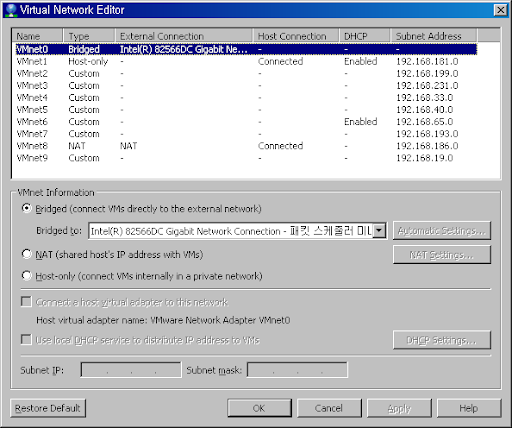
vmnetcfg.exe 설정


Bridged의 랜카드를 잡아준다.


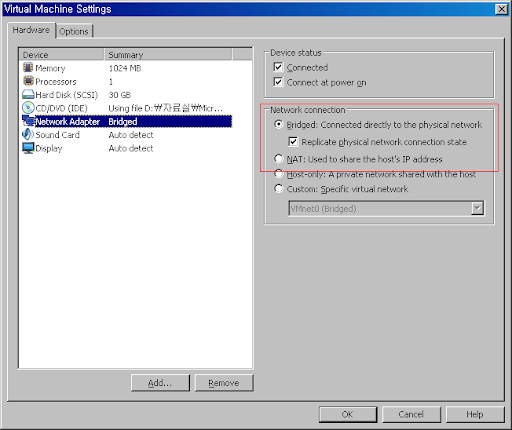
VM머신의 네트워크 어뎁터 설정


아래와 같이 설정한다.


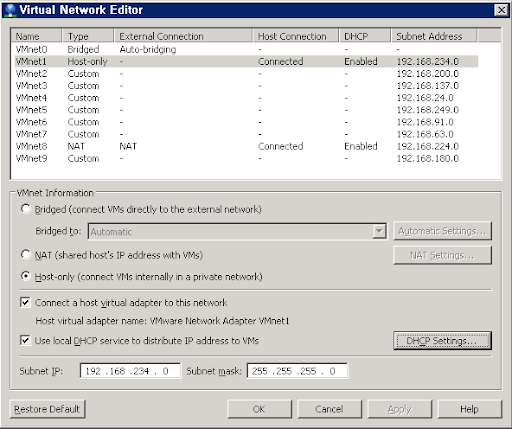
DHCP가 설정되어 있지 않다면 VM머신의 OS에서 네트워크 설정을 해주면 된다.

VMware Player 3.0 이상 버전에서 NAT 등의 네트워크 설정 vmnetcfg.exe 설치 edit

VMware Player 3.0 이후 부터 NAT 등의 네트워크 설정을 해 주는 vmnetcfg.exe가 설치가 되지 않는다고 한다. 그렇지만 설치 파일 안에는 들어있다고 하네요. 먼저 VMware-player-3.0.0-XXX.exe에 /e 옵션을 주어서 실행합니다. 압축 해제만 하는 옵션입니다.
VMware-player-3.0.0-203739.exe /e INSTALL_DIR
여러 개의 파일이 설치가 되는데 그 중에 network.cab 파일 안에 vmnetcfg.exe가 숨어 있습니다. 그 파일만 꺼내면 됩니다.

vmware 우분투 한영키 문제 edit

어찌저찌 찾아보니 vmware에서 우분투를 깔면 한영키와 한자키가 인식되지 않는 문제가 더러 있다고 한다.

http://barosl.com/blog/entry/using-han-eng-key-without-kernel-patch

뿌리 권한으로 다음을 실행합니다:

# setkeycodes 71 122
# setkeycodes 72 123

그다음 xev 를 실행시켜 보면, 커널 패치를 하지 않은 상태에서도 한영키가 122, 한자키가 121 로 인식됩니다!

시스템 시작시에 항상 이 명령이 실행되도록 해 놓는 것이 좋겠죠?

그럼 이제 늘 하던대로 xmodmap 만 먹이면 됩니다. ;)

$ xmodmap -e 'keycode 122 = Hangul'
$ xmodmap -e 'keycode 121 = Hangul_Hanja'

흐흐... 굉장한 팁이군요... 커널 패치의 번거로움이 하나 줄겠네요... ^^

내가 적용한 방법


스크립트 생성


/etc/init.d/hangul_setkeycodes.sh

#!/bin/bash
setkeycodes 71 123
setkeycodes 72 122

시작시 자동으로 실행되게끔 설정


# update-rc.d hangul_setkeycodes.sh defaults

다른위치에 설치된 'pkg-config'의 '.pc'파일 'PKG_CONFIG_PATH'환경변수로 컴파일시 인식시키기 edit

http://kldp.org/node/52070

참고로 위 환경 변수 내용을 바꾸기 전에 pkg-config를 실행해서, pkg-config가 제대로 설정 파일을 인식했는지 확인할 수도 있습니다:

$ pkg-config --list-all

문제


libxml을 다른위치에 설치했더니 pidgin 컴파일시 아무리 CFLAG, LDFLAG, LIBS, LIBXML_CFLAGS, LIBXML_LIBS 환경변수들을 설정해줘도 인식하질 못했다.

libxml/lib/ 하위에 pkgconfig 디렉토리가 있는것을 발견하고, 인식시키려고 configure 실행시 환경변수 'PKG_CONFIG_PATH'에 경로를 환경변수 'PATH'처럼 ':'로 구별하여 평소에 하던대로 실행시만 적용되게끔 아래와 같이 실행해도 인식되지 않았다.

$ PKG_CONFIG_PATH="$PKG_CONFIG_PATH:/home/me/usr/libxml/lib/pkgconfig" ./configure

해결방법


아래와같이 환경변수를 export 시킨 후 configure 해보니 인식성공.

$ export PKG_CONFIG_PATH="$PKG_CONFIG_PATH:/home/me/usr/libxml/lib/pkgconfig"

/2011/08/finchpidgin-compile-cfsh.html

원인예상


configure 도중 내부적으로 pkg-config 를 호출하는데 처음의 방법은 환경변수를 ./configure 에만 전달하고 pkg-config 에는 전달하지 못해서 생기는 문제일까?

pidgin nateon 플러그인 접속 불가 현상 원인 edit

왜 갑자기 pidgin에서 네이트온 접속이 안되나 소켓을 캡쳐해 봤더니...

네이트온 3.5-3.7버전 일부(3.7.3.0) 종료안내

좀더 다양한 서비스와 편리한 기능을 제공하기 위해 네이트온 3.5-3.7버전 일부(3.7.3.0) 종료하게 되었습니다.

*종료일시 : 2011년 8월 1일(월)

그동안 네이트온 3.5-3.7버전 일부(3.7.3.0)를 이용해주셔서 감사합니다.
네이트온 최신 버전을 통해 계속해서 서비스를 이용하실 수 있습니다.
( http://nateonweb-stage.nate.com/download/messenger/windows/4.1/download.php )
감사합니다.

하지만 네이트온 리눅스버전 클라이언트는 잘 동작함.

vi 붙여넣기 시 들여쓰기 자동 들여쓰기 해제 edit

http://devday.tistory.com/entry/vi-붙여넣기-시-들여쓰기-문제

vi에서 붙여넣기를 하면 들여쓰기 때문에 본래 모양대로 들어가지 않는다.

이 때 다음과 같이 하면 문제를 해결할 수 있다.

:set paste

입력모드에서 붙여넣기를 한다.

붙여넣기 작업을 완료하면 다음과 같이 원래대로 복원할 수 있다.

:set nopaste

http://kldp.org/node/28154

Minecraft server configurations edit

server.properties


http://www.minecraftwiki.net/wiki/Server.properties

server.properties
#Minecraft server properties
#Tue Jun 07 18:05:30 KST 2011
level-name=world
view-distance=10
spawn-monsters=true
online-mode=false
spawn-animals=true
max-players=10
server-ip=
pvp=false
level-seed=randomseed
server-port=25565
allow-flight=false
white-list=false
allow-nether=false
public=false
max-connections=1

  • online-mode - 접속하는 유저들이 마인크레프트의 정식 유저인지 체크 (true, false)
  • max-players - 최대 동시 접속자 수 제한
  • public - 서버 리스트에 표시 여부 (true, false)
  • max-connections - 한 IP당 허용할 접속들 (1~3 (3 이상의 값을 설정해도 3))

Bukkit mod


플레이에 필수적인 플러그인들은 Bukkit 모드가 필요하다.

다운로드 및 설치법: http://wiki.bukkit.org/Setting_up_a_server

마인크래프트 공식 사이트에서 받는 'minecraft_server.jar' 파일을 실행하는 대신에 bukkit mod 의 jar 파일을 실행하는 방식.

필수 플러그인들


  • lwc - 체스트 잠금 플러그인
  • register / login 플러그인
  • home / sethome 플러그인 (+다른 유저의 집으로 이동하는 기능도 유용함)
Newer -> <- Older