Apache: _default_ VirtualHost overlap on port 443 edit

http://www.twopenguins.it/2011/04/apache-_default_-virtualhost-overlap-on-port-443-the-first-has-precedence/

If you have just added another VirtualHost with SSL and Apache is giving to you this error:

[warn] _default_ VirtualHost overlap on port 443, the first has precedence

Probably you miss a

NameVirtualHost *:443

at the top of your httpd-vhosts.conf file.

Debian

데비안에서는 /etc/apache2/ports.conf 파일안에 <IfModule mod_ssl.c>와 </IfModule>사이에 넣어준다.
Get root permission and save a file inside of vim editor edit

http://stackoverflow.com/questions/1005/getting-root-permissions-on-a-file-inside-of-vi
:w !sudo tee %

Debian .deb package file download and extract or view content edit

Download .deb package file

$ aptitude download package-name

View content

$ ar tv package-name.deb

Extract

$ ar xv package-name.deb

ffmpeg audio encoding edit

$ ffmpeg -i in.mp3 -ab 128k out.mp3

Windows suspend cmd edit

rundll32.exe powrprof.dll,SetSuspendState 0,1,0

How to re-enable aero effects in Windows 7 edit

http://superuser.com/questions/28685/how-to-re-enable-aero-effects-in-windows-7-after-it-has-crashed

net stop uxsms
net start uxsms

Origin 다운로드 속도는 DNS서버와 관계가 있다. edit

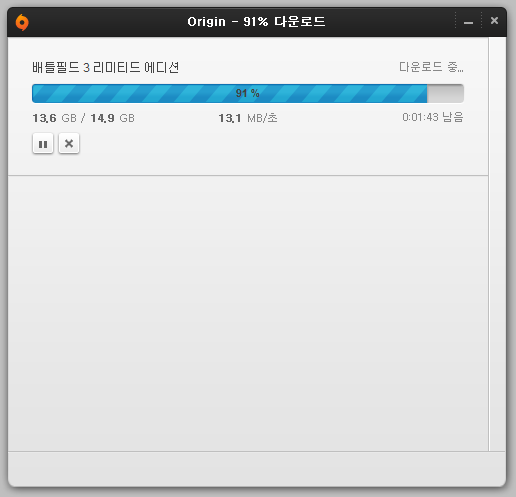
다운속도가 200KB/s 나오던게 혹시나해서 DNS서버를 자동으로 받게끔(168.126.63.1) 돌려놨더니 12MB/s 씩 뜬다. 바꾸기 전 DNS서버는 8.8.8.8(Google) 이었다.

윈도우즈7 스피커와 헤드셋 동시에 오디오 출력하기 edit

It took some time searching around but I finally managed to find an answer by myself, I'm posting the solution here in case anyone has a similar issue:
  1. Open Sound panel
  2. Select Speakers as the default playback device
  3. Go to the "Recording" tab
  4. Right click and enable "Show Disabled Devices"
  5. A recording device called "Wave Out Mix", "Mono Mix" or "Stereo Mix" (this was my case) should appear
  6. Right click on the new device and click "Enable"
  7. Right click on the new device and click "Set as Default Device"
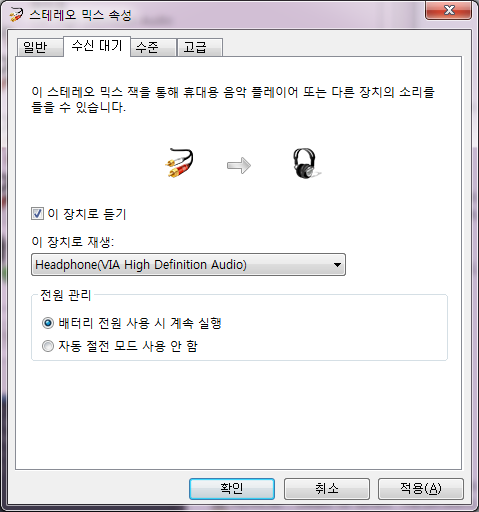
  8. Double click on the new device to open the Properties window
  9. Go to the "Listen" tab
  10. Click on the "Listen to this device" checkbox
  11. Select your HDMI device from the "Playback through this device" list
And you're done, the drawback is that you won't have a microphone selected as default recording device, but for what concerns me I couldn't care less.

아래처럼 설정해주면 된다. 만약 소리가 안난다면 볼륨을 체크해본다.

Python SocksiPy Global Setting edit

SocksiPy?

This module was designed to allow developers of Python software that uses the Internet or another TCP/IP-based network to add support for connection through a SOCKS proxy server with as much ease as possible.

Global Setting for urllib2 Example

You can use SocksiPy module. Simply copy the file "socks.py" to your Python's lib/site-packages directory, and you're ready to go. you must use socks before urllib2. For example:
import socks
import socket
socks.setdefaultproxy(socks.PROXY_TYPE_SOCKS5, "127.0.0.1", 8080)
socket.socket = socks.socksocket
import urllib2
print urllib2.urlopen('http://www.google.com').read()
You can also try pycurl lib and tsocks, for more detail, click on here.

Newer -> <- Older