Showing posts with label firefox. Show all posts

Firefox ssh SOCKS 5 tunneling is too slow! edit

Firefox is the best browser for surf the web through proxy connection. it supports independent proxy environment. not like Chrome browser and Internet Explorer. (Chrome inherits Internet Explorer's proxy settings.) Basically Firefox has it's own proxy function in it.

Few days ago, I wanted to surf the web through my server but It seemed something went wrong, tunneling connection was very slow and even ssh terminal was not responding while trying to connect a website. this problem could be caused by ssh connection or Firefox. I set the SOCKS 5 proxy for Internet Explorer for test and it was working fine. so I figured that ssh connection wasn't the problem.

The problem was Firefox. I installed many plugins and extensions after many years of usage. proxy function was gliched somehow.

To fix the problem, simply you can Reset your Firefox browser. before you do that, make sure you have backups for bookmarks, plugin list, etc..

Alt-H -> Troubleshooting Information -> Reset Firefox

References

http://support.mozilla.org/ko/questions/760364

파이어폭스 탭을 트리스타일로 만들어주는 "Tree Style Tab" edit

https://addons.mozilla.org/en-US/firefox/addon/tree-style-tab/


나이스!

Firefox HTTP 301 redirected permanent update edit

Firefox page captures sometimes fail with an "out of memory" error temporary fix edit

https://addons.mozilla.org/en-US/firefox/addon/pagesaver/

Note: we are aware of a problem where, on some Windows systems, page captures sometimes fail with an "out of memory" error. This is caused by a Firefox bug that has been fixed; the fix should be included in Firefox 8. In the meantime, please refer to the Known Issues and Limitations for more information including a temporary workaround for this problem.

http://pearlcrescent.com/products/pagesaver/doc/#knownissues

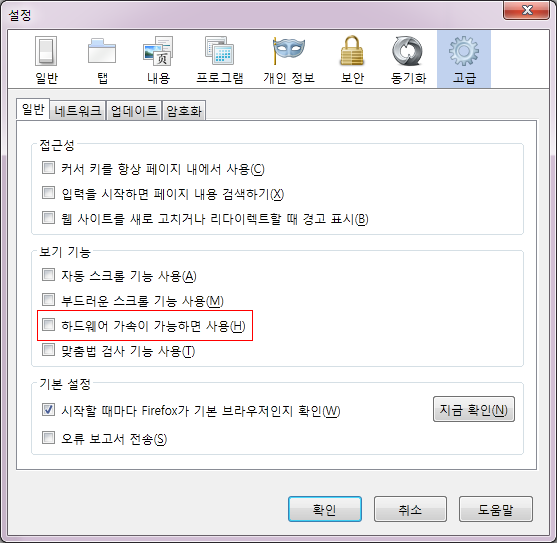
With Firefox 4 and newer on some Windows systems, attempts to capture a page that is taller or wider than 8,192 pixels may fail and an "out of memory" error will be reported. This is caused by Mozilla bug 649924 which occurs when hardware acceleration is used. To work around this problem, follow these steps to disable hardware acceleration:

  1. Open the Firefox options and view the Advanced panel.
  2. Within the General tab (Browsing section), uncheck the Firefox option named "Use hardware acceleration when available".
  3. Restart Firefox.

Uncheck the Firefox option named "Use hardware acceleration when available":


파이어폭스 오른쪽 버튼 잠김 풀기 edit

http://goodlifegood.tistory.com/492

아래 항목들을 체크 해제하면 됨

파이어폭스4에서는 뭔가 선택항목이 줄었음

도대체 왜막는 겁니까 왜!
<- Older